Cryolabs - sci-fi battle map pack w/Fantasy Grounds support - TTRPG Map
Publisher: Dungeon Masters Guild

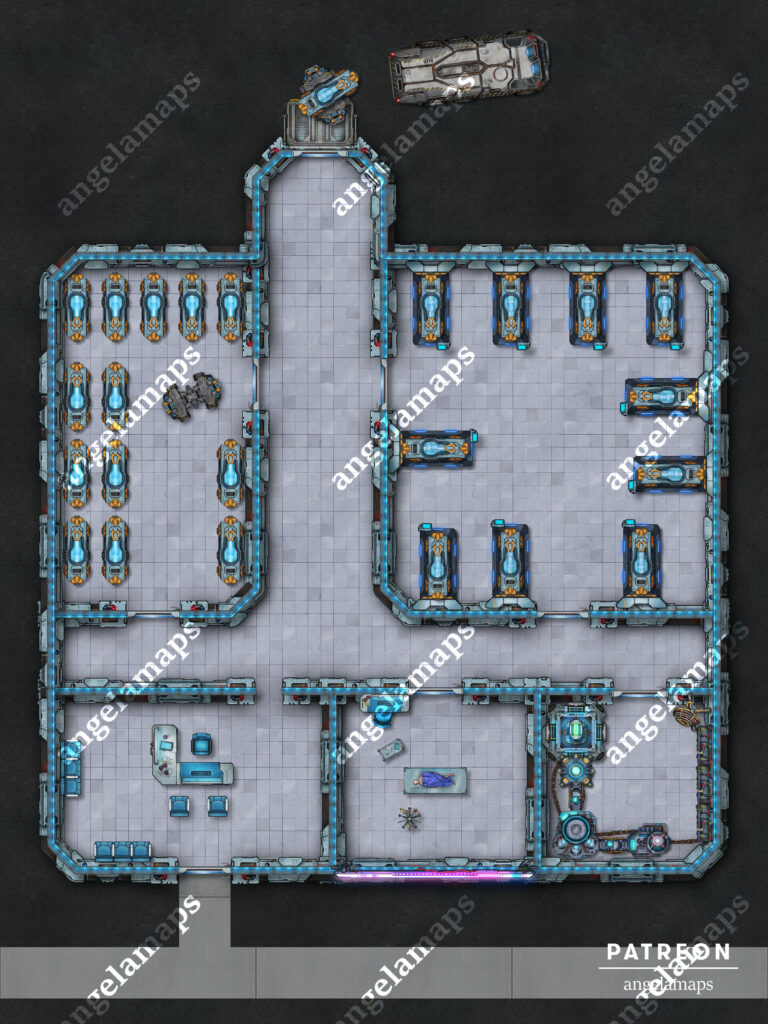
CRYOLABS SCI-FI BATTLE MAP PACK

Are you or a loved one facing a terminal illness? At Cryolabs, we specialize in preserving life through advanced cryogenic stasis technology. Our state-of-the-art facility can place you in deep freeze, allowing you to remain safely preserved until a future date when a cure for your condition may exist. Throughout your stay, our medical professionals provide continuous monitoring and care.
Cryolabs can also place a recently deceased loved one into cryogenic stasis in the hope that future medical breakthroughs may enable their revival.
Planning a long-distance or interstellar journey? Experience near-instant travel from your perspective with our cryo-stasis travel services. We handle secure transport to your vessel and can configure your stasis pod to wake you on a set schedule or via manual activation by a crewmate.
Speak with a Cryolabs consultant today and discover how we can help extend, preserve, or enhance your life.
All setup and ready to play in Fantasy Grounds
- Three .jpg maps 30 x 40 (3000 x 4000)
- Fantasy Grounds .mod file which has all of the maps with LoS and grid data
FAQ:
Do these maps work with Roll20/Foundry/XXX virtual tabletop?
You can import the JPG files into any system you use to play your games onlie that allows them, however, if you want to use the .mod file with the grid and line of sight data you will need to use Fantasy Grounds Unity.
The webm v8 files sold here are specifically for use in fantasy grounds, all other places my maps are sold these are v9.
How do I use the .mod File?
- When you open up Fantasy Grounds Unity, before you load anything else up, click on the folder in the top left corner of your screen.
- This will open the place on your computer the Fantasy Grounds file are saved. Drag the .mod file into the folder called “modules”.
- Once you load your game, in the bottom right you should be able to choose Library —> Modules and choose the file you just added.


 Price
Price: $4.99